To manage energy in a DJ set, rate every track in your library by energy, store the rating somewhere your DJ software can sort and filter on, and plan the set as a curve that climbs one step at a time. With energy tagged, picking the next track turns into a search: choose the energy level you want, filter to it, then choose by key and BPM.
Most DJs work the other way around. They pick the next track because it sits next door on the Camelot Wheel, and only notice afterwards that the floor emptied, even though the key was fine.
Why mixing in key isn’t enough
Harmonic mixing tells you whether two tracks sound good together. It doesn’t tell you whether the second track suits the moment. Two tracks in 8A can be a soft, dubby groove and a full peak-time anthem, and mixing one into the other gets you a harmonically clean transition and a crowd with whiplash.
DJing is mostly about managing energy. Every track you play should match the energy the room is giving you, or push it a little further. Key is how you make that move sound smooth, but energy decides which move to make.
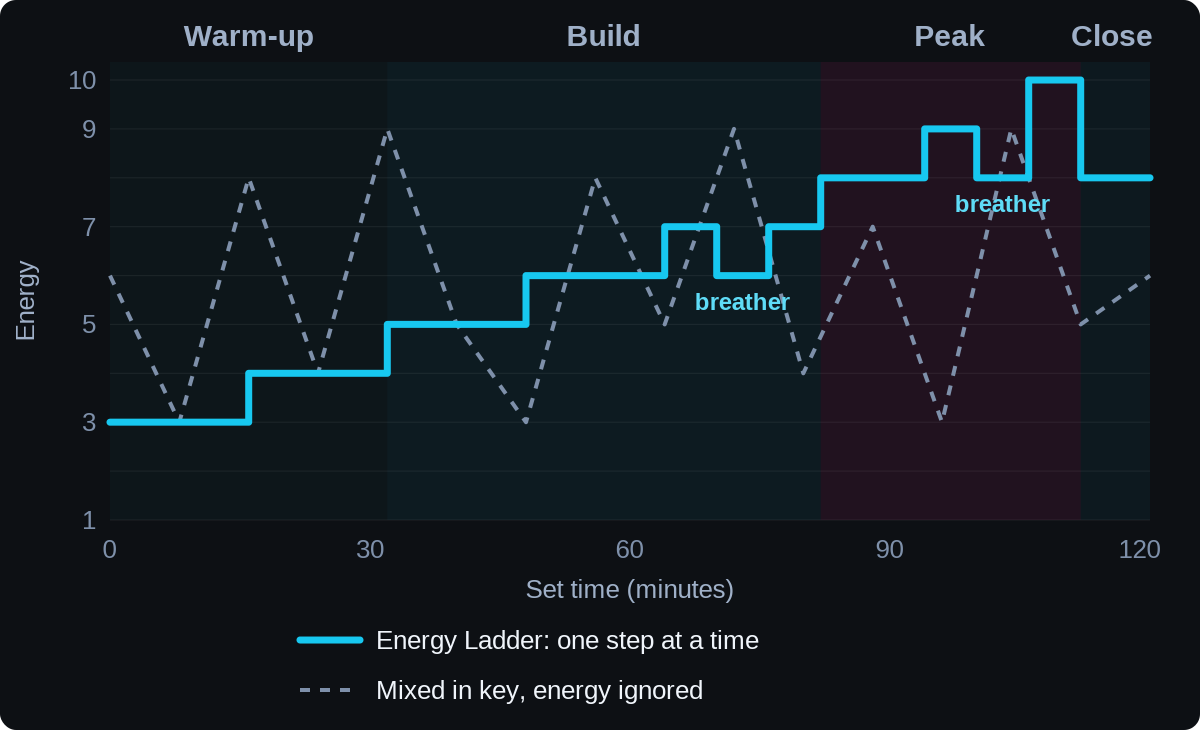
The dashed line is a set where key was the only rule: every transition is “safe,” and the energy still lurches between 3 and 9. The solid line is an Energy Ladder, which climbs one step at a time with a couple of deliberate breathers on the way to the peak.
What a track’s energy level means
Energy is how intense a track feels on a dancefloor, and it’s a different thing from BPM. A 122 BPM tech house roller can hit harder than a 128 BPM melodic track.
When you rate energy, listen to how busy and driving the drums are, whether the bassline rolls along or hits you in the chest, and how big the vocals and hooks are (a singalong lifts a room more than a chopped vocal sample). Then listen to the builds and drops, and to the breaks. Long, calm breaks pull the energy down, and short ones keep the floor moving.
How to rate tracks by energy
Most DJ software already has a place for this: the star rating column. Rekordbox, Traktor and Engine DJ all have one, and it usually ends up marking how much you like a track. Use it for energy instead. If you don’t like a track, delete it from your library.
One working DJ splits the five stars like this:
- ★ Minimal (energy 1-2): downtempo tracks and soundscapes with little or no drums. For background sets, intro tracks and the very start of the night.
- ★★ Starters (3-4): full drums but calm, lower BPM, often with long breaks. For opening sets and the first stretch of a long set.
- ★★★ Meat and potatoes (5-6): steady energy, progressive melodies and shorter breaks. These keep the floor moving without showing off, so they make up the bulk of most sets, and they layer well in a techy set across three or four decks.
- ★★★★ Heaters (7-8): big builds and releases, tension and drama, more prominent vocals and drops. For raising the energy toward the peak.
- ★★★★★ Bangers (9-10): the craziest builds and the biggest drops, saved for peak time when the crowd is already going hard.
The numbers in brackets are a 1-10 scale with two points per star. Use them if you want finer steps, for example to go from a gentle Heater (7) to a heavy one (8) without jumping a whole tier.
Four habits keep the ratings honest:
- Rate the main section. A track can open like a Starter and drop like a Heater, and the floor feels the drop.
- Rate against your own library. A Banger in a deep house collection and a Banger in a hard techno collection are different tracks, which is fine as long as your scale is consistent with itself.
- Pick an anchor track you know well for each tier. When a new track is hard to place, compare it with the anchors on either side.
- Re-rate after you play a track out. If a Meat and potatoes track keeps lifting the room like a Heater, bump it up.
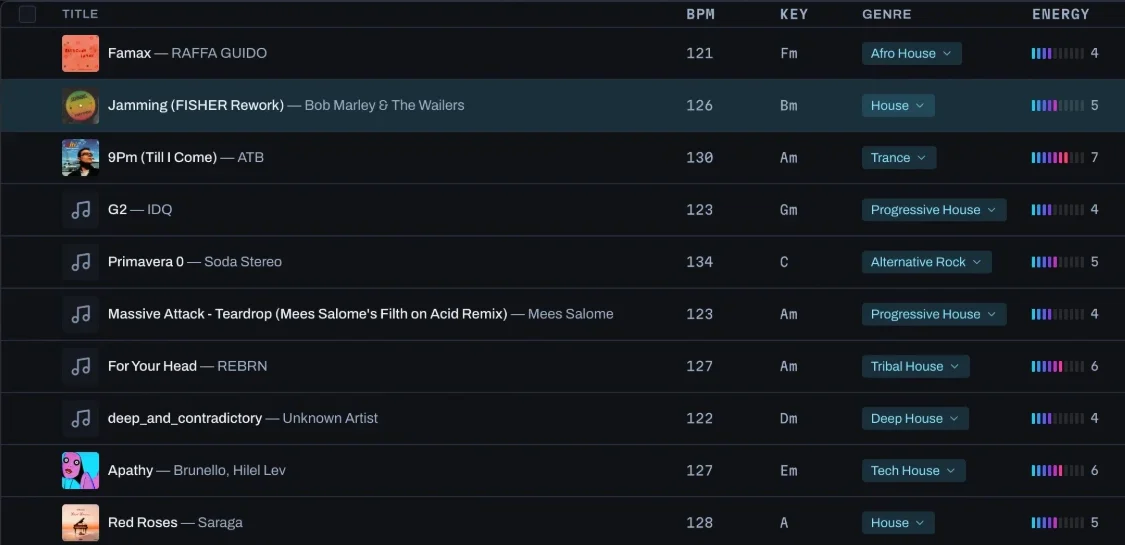
DaJent analyzes each track and gives it an energy level from 1 to 10, so you start from a rated library. When you send a playlist to Rekordbox, it converts energy into stars with the same two-points-per-star mapping, and your tiers show up in the rating column on the CDJs without any retyping.
Write a comment for every track
The energy rating tells you when to play a track, and the comment tells you what’s in it. For every track in your library, write a 5 to 10 word description in the comments field, like these:
- spacey drums, long mid break, soulful female vox samples
- rolling bass, no vocals, hypnotic synth loop
- tempo drops at 3:40, careful in the mix
- dub mix: no hook until the second drop
Summarizing a track makes you listen for its elements, and that fixes it in your memory, so you’re more likely to remember it while scrolling mid-set. The comment also warns you about the odd things, like a tempo change, an extra-long break or a fake ending. And when a release has an original and four remixes, the comment is how you tell which one you want.

DaJent does some of this describing for you. Each track gets vibe tags such as vocal or instrumental, hypnotic, and percussive or melodic, and the waveform marks the intro, drops and breaks, so you can see a long break or a late drop before you load the track. When you export, the tags can go into the Rekordbox comments field next to whatever you wrote yourself.
Hot cues and a saved loop
Label your hot cues (intro, first drop, break, outro) and save at least one loop on every track. The loop is for emergencies: it keeps a track going when the next one isn’t ready, or stretches a transition when the blend is working and you want more of it. DaJent’s Rekordbox export carries both across.
Build crates around energy
Once every track has a rating, make one crate or smart playlist per tier: Minimal, Starters, Meat and potatoes, Heaters and Bangers. In Rekordbox, that’s an Intelligent Playlist filtered on rating. Sort each crate by key and BPM, so that energy chooses the crate and key chooses the track.
The Energy Ladder
The Energy Ladder means moving through your tiers one step at a time. Software can draw the curve, but you decide the steps, and those decisions are what make a set feel planned.
- Climb one step at a time. Jumping two can work as a deliberate lift, but going straight from Starters to Bangers almost never does.
- Hold each level for two or three tracks so the room can settle before you climb again.
- Drop down a step for one track before a big climb. The small release builds tension, and the next step up hits harder.
- Ration your Bangers. A peak only feels like one if it’s rare, and fifteen Bangers in a row is just loud.
Plot your set on an energy curve
Before a gig, plot the set with track order along the bottom and energy up the side. A spreadsheet with a line chart is enough to start. Then look at the shape. Does it climb, or does it flatline? Are there jumps of three or more levels, and did you mean them? Where are the breathers? Is the peak where the night needs it, and short enough to stay special?
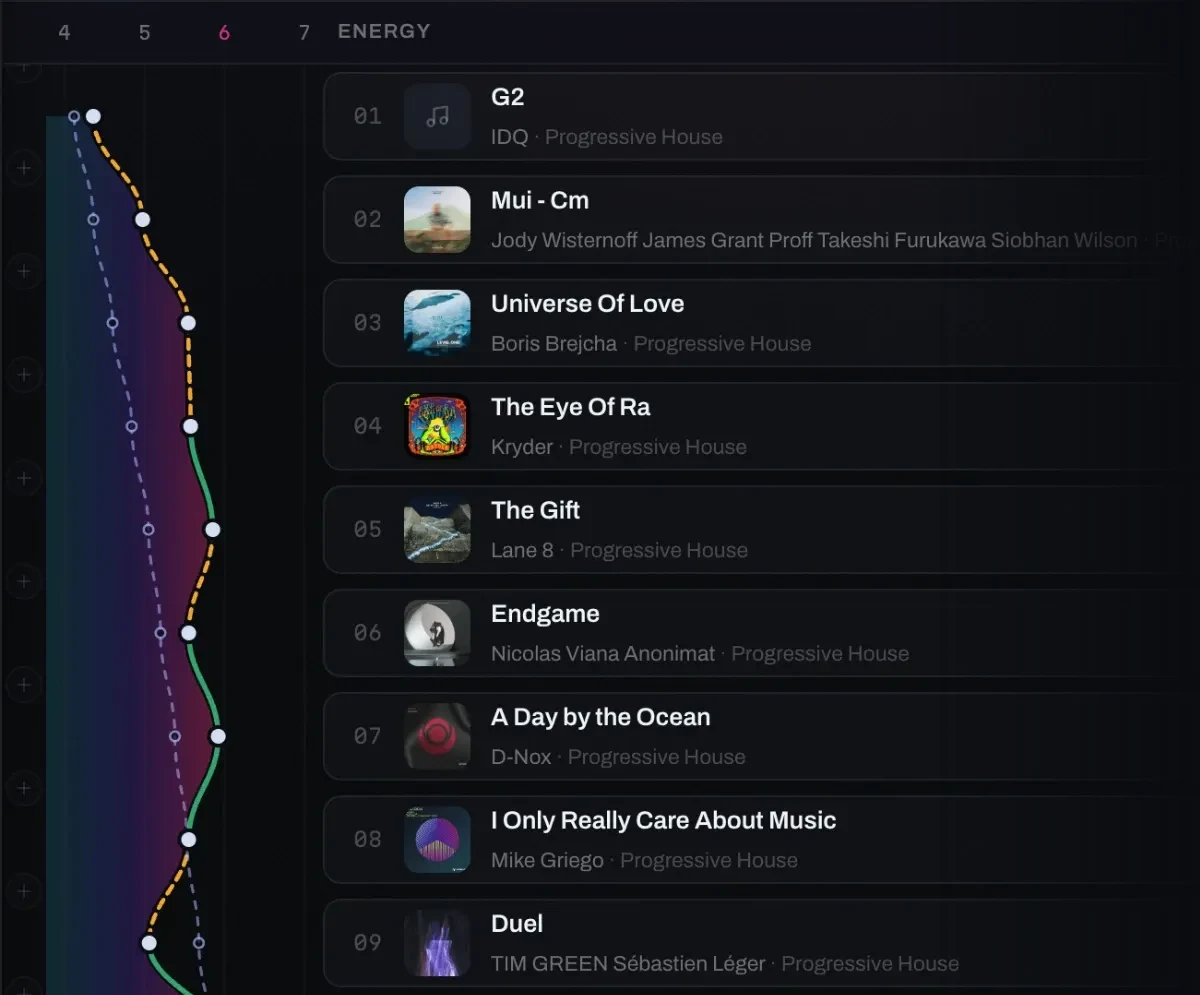
DaJent’s set builder draws the curve for you. You set the energy range for the set and drag the arc into the shape you want.

As you fill the slots, each track’s real energy appears next to the target. The dashed line is the curve you drew and the solid line is where each track sits, so a track that overshoots or falls short shows up while you’re still planning.
The shape depends on your slot:
- Opening set: a slow climb through Starters into Meat and potatoes. You’re there to build tension and leave the room wanting the peak, so keep your Bangers in the bag. An opener who plays at headliner energy makes the headliner’s job harder.
- Peak time: start in Meat and potatoes and ride a wave between Heaters and Bangers, with breathers so the drops keep landing.
- Closing set: start from the peak and step down through the tiers to a soft landing.
- Weddings and private events: expect waves. Dinner sits in Minimal, the first dances spike, and the floor needs a few peaks and resets over the night.
Shifting energy mid-set
You’ll change the plan once the room starts reacting, and with a tagged library the track you need is one filter away. If the crowd is ahead of you, step up a tier and pull from the next crate. If the floor is thinning, drop a tier, find the groove again and rebuild. If the room is locked in, stay at that level longer than you planned.
Each time, work in the same order: pick the energy level, filter to that crate, choose a track in a compatible key, check the BPM, and glance at the comment for surprises.
Where DaJent fits
You can do all of this with a spreadsheet and a lot of evenings, and DaJent’s DJ library software cuts down the evenings. It rates every track from 1 to 10 and adds vibe tags, and you correct the ratings you disagree with. The waveform marks intros, drops and breaks, so you know a track’s shape before you write its comment. In the set builder you shape the energy arc, fill the slots and check each track against the curve. When the set is ready, send it to Rekordbox: energy becomes the star rating, tags go into comments, and hot cues and loops come along.
Try DaJent free →Energy tagging checklist
- Star rating means energy, not how much you like the track
- Anchor track chosen for each tier
- Rated on the main section, not the intro
- 5 to 10 word comment written, including any warnings
- Hot cues labeled and at least one loop saved
- One crate or smart playlist per energy tier
- Set plotted on an energy curve, with breathers before the big climbs
- Ratings updated after each gig
Frequently asked questions
Is energy level the same as BPM?
No. BPM is speed and energy is intensity. They often move together, but a slow track can feel huge and a fast one can feel light. Use BPM as a filter inside an energy crate.
Should I rate energy 1-5 or 1-10?
Five stars fit the rating column in your DJ software and are quick to apply. A 1 to 10 scale gives you room to climb gradually inside a tier. You can use both by rating 1 to 10 and mapping two points to each star, which is what DaJent does when it exports to Rekordbox.
What if my DJ software has no rating column?
Put the energy at the start of the comments field, like E07, and filter on it. Zero-pad the number (E01 to E10) so a search for E1 doesn’t also match your 10s.
Can I trust automatic energy analysis?
As a starting point. Software is good at measuring loudness and density and worse at hearing that a vocal hook makes the whole room sing, so spot-check the automatic ratings against your anchor tracks and fix the ones that are off.
How many tracks do I need in each tier?
Enough that no tier is empty for the gigs you play. An opener needs depth in Starters and Meat and potatoes, and a peak-time DJ needs plenty of Heaters plus a handful of Bangers. If a tier is thin, that’s your shopping list for the next dig.
Does mixing in key still matter?
Yes. Clean harmonic transitions make a set sound polished. Choose the energy move first, then use key to make it smooth.
Related: How to Organize Your DJ Music Library (2026 Guide) | How to Prepare for a DJ Gig (Complete Prep Checklist)